Finally, getting rewarded for indulging
See the code on GitHub: DonutBot
I'm part of a local Discord community that, back in 2025, for whatever reason, decided to hold a hot dog eating contest. Now I'm not talking about one of these exceedingly American events where people try to eat as many hot dogs as possible in an hour: this was instead a year-long enterprise to see who would end '25 with the most hot dogs in their tummy (the answer was 59, although we only started in May. Extrapolating, that person could have eaten north of one hundred hot dogs, had they started on January 1st. Truly, the power of the human spirit is astonishing).
The winner got to decide on the next year's theme, and they picked... well I was going to write a joke here like "salad", but you've already seen the article name, so yeah, it was donuts. Now, in the past someone would manually update a tally every time a member posted a picture of a hot dog, which is dreadfully antiquated. They did vibe code an app to generate a nice leaderboard to post, but I thought we could extend the vibe farther, to the point where a machine could take on this burden.
So I made a Discord bot that grabs the pictures you send on the #donut-championship channel, forward them to OpenAI with the prompts "how many donuts is this", and updates a database with the result. Then I lost my mind and added a ton of features that nobody asked for. Let's talk about that!!
How does one "make a Discord bot"
This turns out to be super simple thanks to the work of the good people over at Pycord, who made a great library to program a Discord bot in, you guessed it, Python. You register your bot on the Discord Developer Portal, do a little bit of config, set up some tokens and permissions, and in no time at all you can have your very own artificial lifeAn, ready to serve your every whim.
Now you can run this off your own machine, but ideally you want it to live independently of you. For this I use Render, which is very straightforward to use (that's what this website is running on!), and pretty cheap for this kind of use case (since I needed some persistence I had to spring for the "starter" tier, which is only $7 a month; if I didn't need persistence, I could have gotten away with the free tier).
And what does one do with a "Discord bot"
All sorts of things, turns out, but mostly have it react to messages and do stuff when you send special commands. In this case, what I wanted to do was make the process of registering a donut as easy as possible. The first version of the bot was a simple CRUD application where you could just run commands like /add 3 to increment your Donut Score™ by three. You could then type /top to get a leaderboard printed. It was basically a first-year software engineer student's project.
This was an improvement in that it no longer required one person to update the tally and occasionally post it, but it still required people to do stuff, and if you've ever had to deal with Users, you know that they do not, under any circumstance, do stuff. You have to get stuff to happen for them, or it won't. So I had to somehow figure out a way that when people would post their donut pics, they would get automatically counted.
Now Pycord does let you tell when an image has been posted, but that alone isn't enough: a picture could have more than one donut, or no donuts at all. It was time to embrace the future, and feed these slop pics into the slop machine.
Prompt engineering is my passion
OpenAI has an API to do image recognition, and it's wonderfully simple. From their doc:
from openai import OpenAI

client = OpenAI()

response = client.responses.create(
    model="gpt-5.6",
    input=[
        {
            "role": "user",
            "content": [
                {"type": "input_text", "text": "what's in this image?"},
                {
                    "type": "input_image",
                    "image_url": "https://api.nga.gov/iiif/a2e6da57-3cd1-4235-b20e-95dcaefed6c8/full/!800,800/0/default.jpg",
                },
            ],
        }
    ],
)

print(response.output_text)
You specify a model, you give a prompt, and you provide a link to the image. Before that you also need to register an account and put some money on it (although not a lot; this is surprinsgly cheap, at least if you're only processing a few dozen pics a week), but all in all it was very straightforward. I could get the image URL directly from Discord, so now the only question was what to ask.
Since I wanted something that I could process in code afterwards, I asked the model to count the donuts and return a single integer with no additional text. There are likely more professional ways to do this, MCPs and whatnot, but this worked fine for my purposes. More complicated, as it turns out, was to land on a definition of what a donut is. Do donuts need to have holes? Is a cronut a donut? What about a mochinut? Is a cinnamon bun a donut? No, right? But why not?
After many iterations, this is what I landed on:
If there are donuts on this picture, return the number of donut(s).
If not, return 0. Only return a single integer with no additional text.
In this context, donuts include both ring and filled donuts, along with related
fried pastries like cronuts, fritters, mochi donuts, shakoys, berliners, etc.
Do not count baked pastries like danishes, cinnamon rolls, etc.
Donut holes count as 1/4th of a whole donut, so return 1 for a picture of four donut holes, 2 for eight, etc
Basically, any kind of fried pastry counts as a donut, which includes stuff like churros, which doesn't feel right, but if you try to be more precise than this you run into all sorts of issues (is a chinese donut a donut? Yes? And how, exactly, is it different from a churro?).
Also note the donut-hole-to-donut conversion ratio. It naturally opens up a whole can of worms regarding what counts as one donut, seeing as a Krispy Kreme original is 190 kcal, while an apple fritter from Voodoo donuts clocks in at a cool 830 calories.
Ultimately I made a prompt alteration for the donut holes because they're easy to identify, but mini donuts might not be, if there are no other objects for scale. I experimented with having the AI try to estimate the calorie content, but it was not particularly precise, especially since you can't tell what the filling, if present, is. So whatever, a donut is a donut.
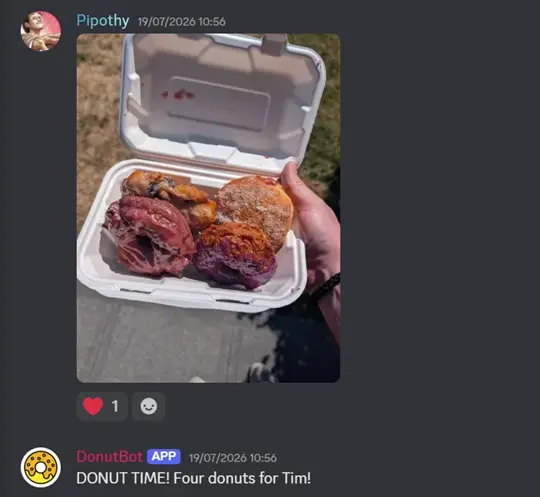
So this is how the system works: when people post a picture, and unless they include !nobot in their message, I send it to the OpenAI API, get an integer back, print out the addition to the chat, and update the score, stored in a lightweight SQLite database. You can also write !maybebot if you want to see what the bot would have added, without actually affecting your score.
Extra features that people were definitely asking for
Stats
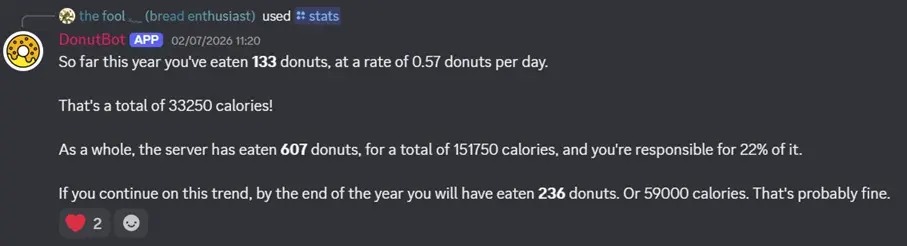
Right, so that's this problem sorted: people post pics of donuts, they get counted automatically. They can call /top to get the leaderboard. Ok, maybe I'll make it so that instead of having to query the top every time, you can create a self-updating leaderboard that gets refreshed every time someone's score changes. Call it /autotop. Right, right. Well, going back to this calorie talk earlier, maybe, just for fun, I'll add a /stats feature that gives you some fun facts about your diet:
Graphs
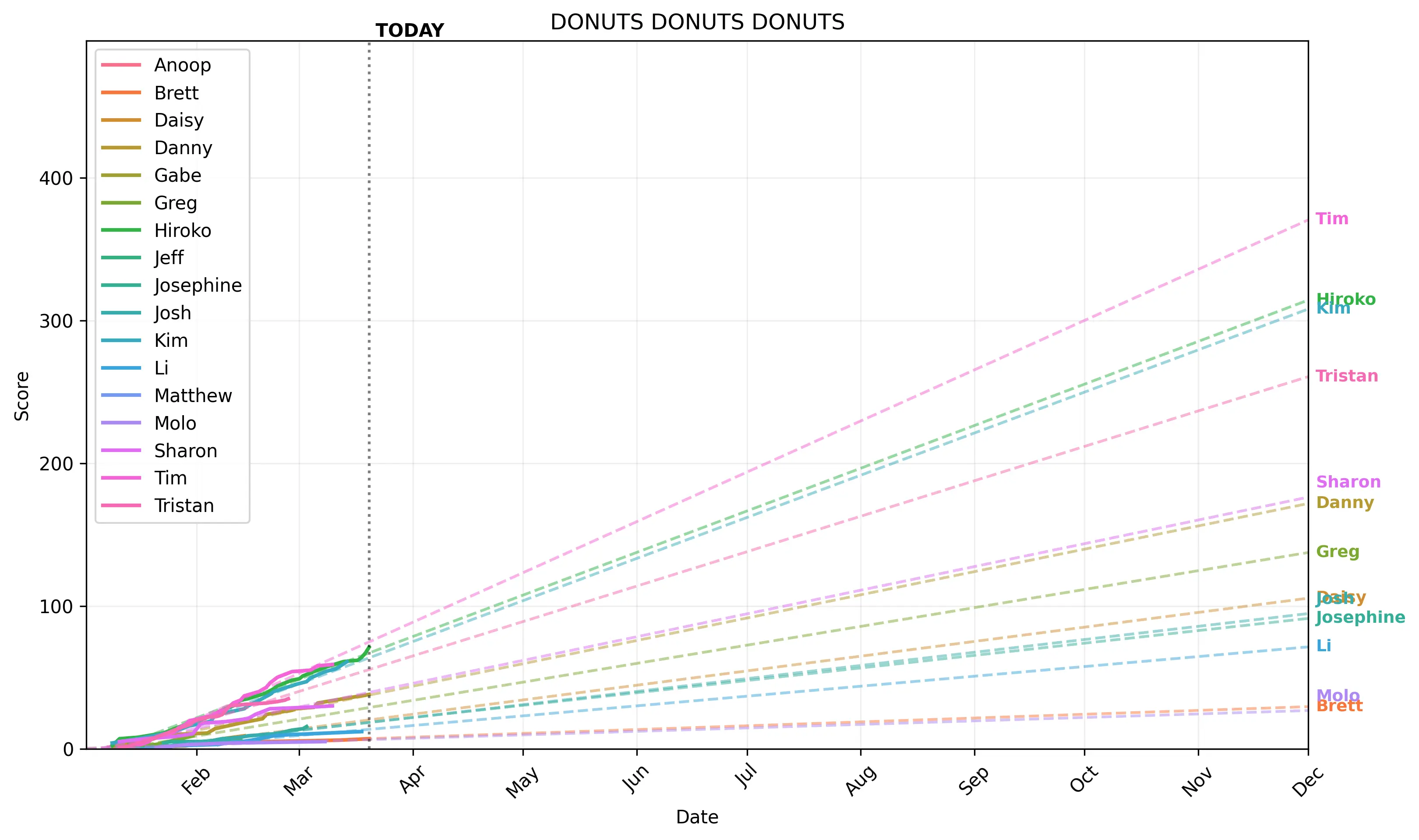
Ok, cool. Say, since we're predicting the future, might as well make a nice chart out of it, yeah? At first I made one that shows the evolution of the score so far:
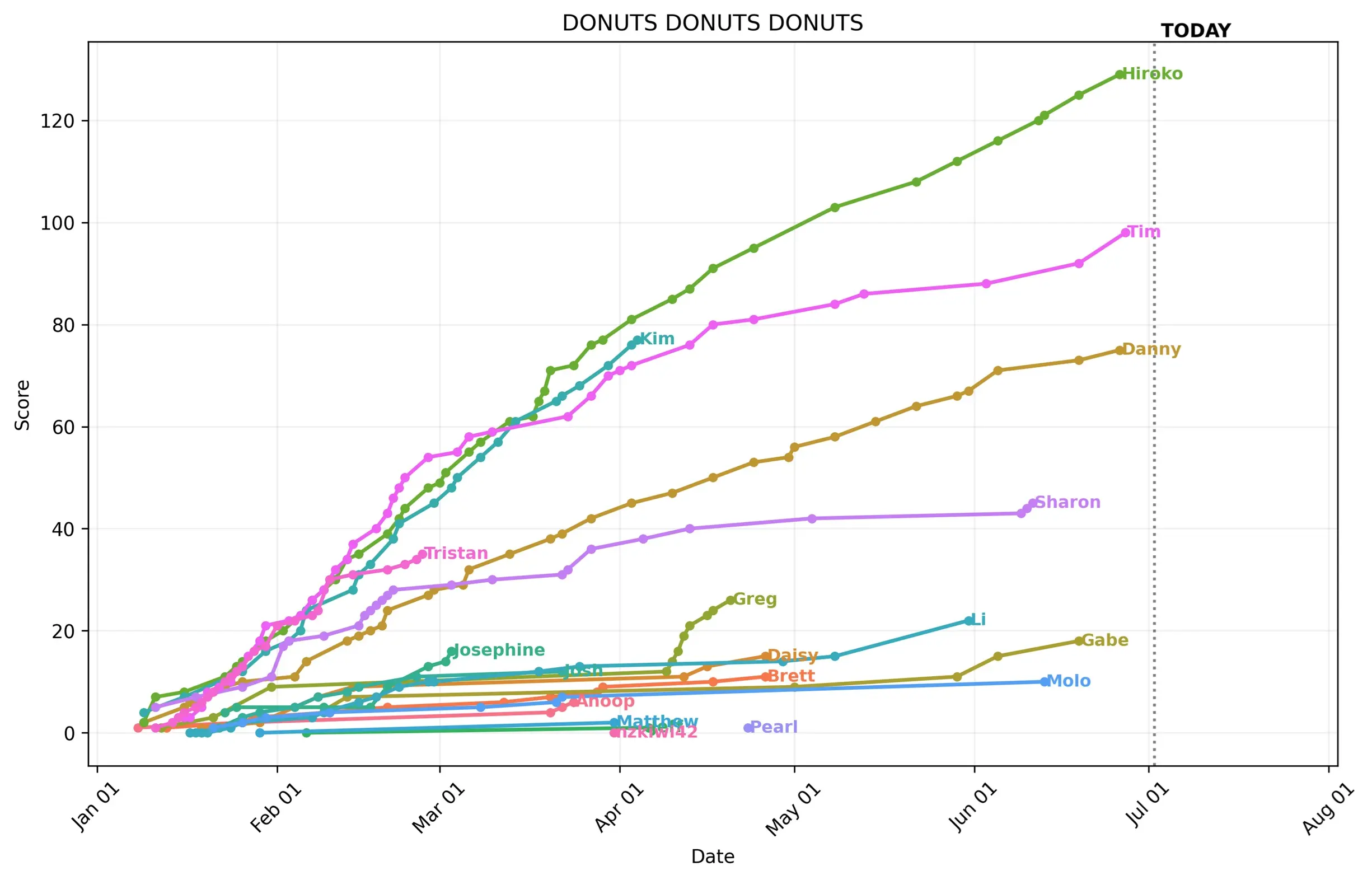
To make a trendline that's more than a simple linear projection, I recruited local physics PhD, data scientist and all around genius Kim, who made a nice Math Thing™ to predict my inevitable triumph:
Collages
That's the statistics side of things well explored. What else? Maybe we can do something more with the pictures? Sure thing, check out /board:
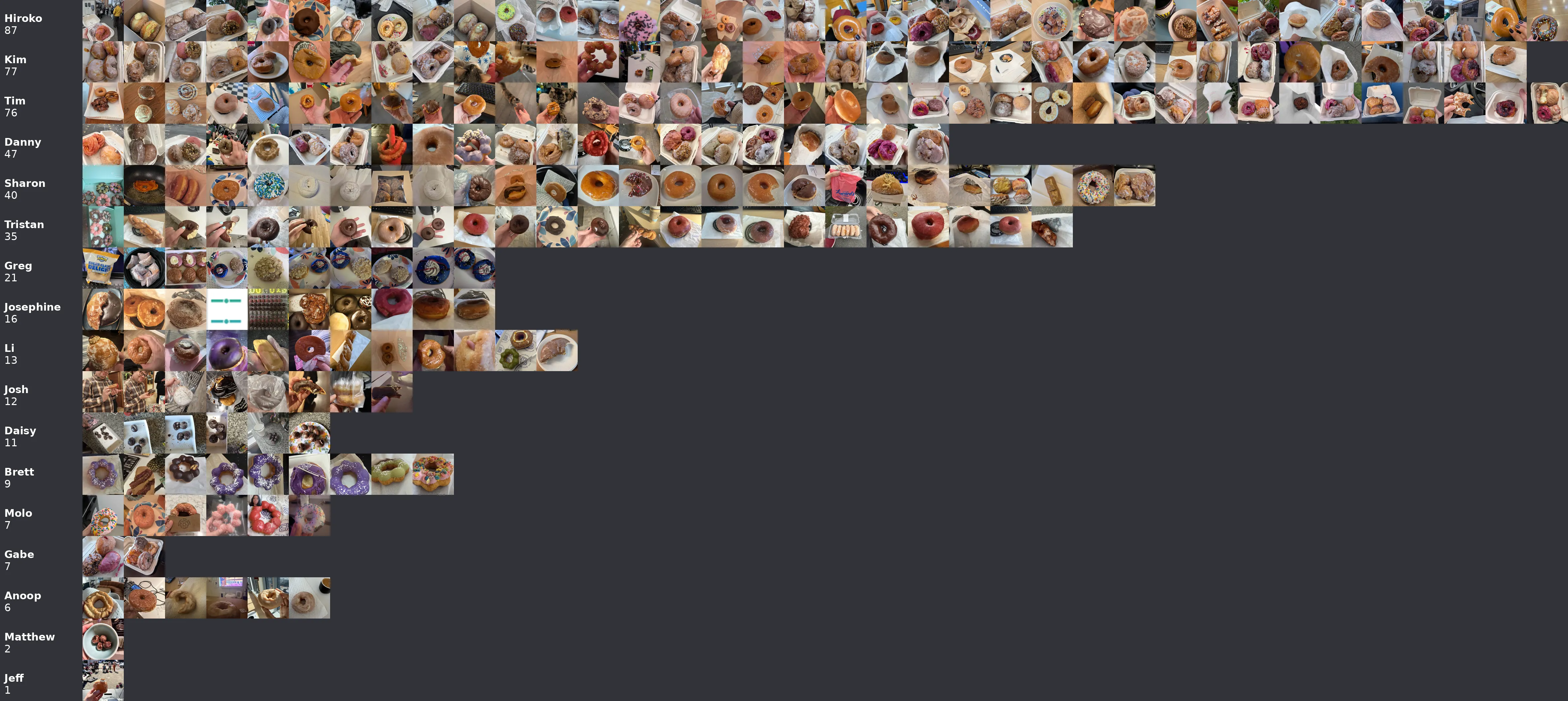
This one was fun to make. There were a couple of things to figure out: first, up until now, I hadn't dealt with the images directly. I just fed Discord's URL as a reference to the AI model. I would now have to download and save the pictures.
Now the thing is, even after Discord's compression and webp conversion, these could still be pretty large, and for our purposes (making a collage of donut pics), we didn't exactly need 8K resolution. So I set it to save the picture as 800x800 px thumbnails. This in turn brought up the issue of aspect ratio: some pics are in landscape mode, others in portrait, there are different resolutions, etc. I ended up resizing the smallest side to 800px, and then cropping everything but the center.
img = Image.open(BytesIO(response.content))
is_portrait = img.height > img.width
aspect_ratio = img.height / img.width if is_portrait else img.width / img.height
small_side = int(config.settings["pics"]["size"])
large_side = int(small_side * aspect_ratio)
margin = int((large_side - small_side) / 2)

if is_portrait:
    img = img.resize((small_side, large_side), Image.Resampling.LANCZOS)
    img = img.crop((0, margin, small_side, small_side + margin))
else:
    img = img.resize((large_side, small_side), Image.Resampling.LANCZOS)
    img = img.crop((margin, 0, small_side + margin, small_side))
Then I made a /collage feature to get all the pictures you've shared stitched into one, and /boardto get all of the server's pictures. Call the same method we use to get the leaderboard, fetch the pictures for each user (I had to add a real world name/discord username mapping system), paste them on a board that's calculated as 800x[users] pixels high and 800x[highest per-user number of pics] wide, plus some margins for labels. At this point I ran into an issue: a single collage with a dozen or two users and hundreds of pictures can get pretty large! Specifically, I ran against multiple overlapping limitations:
- First, WebP images top out at 16 383px a side. So if a user has more than 20 pics, the image will be too wide.
- Then, discord limits embeds to a maximum area of 90 250 000 px. For a square image that's 9500px a side. If we max out the webp width, we'll be limited to a height of 5508px, so 6 users at most. Not great.
- And then a soft limit was that my Render worker only has 500 MB of RAM to work with, which can easily be exceeded if I try to allocate a large enough image.
There are workarounds to all of these. JPGs can be 65k pixels a side, so we could have up to 80 users and 80 pictures. PNGs can theoretically be more than 2 billion pixels a side. Instead of publishing directly to Discord, I could upload the picture somewhere and link it. I could spring for a beefier machine, or somehow find a way to render it in chunks. But all in all I figured it would be simpler and neater to degrade the resolution dynamically:
def get_pic_resolution(self, height: int, width: int) -> int:
    largest_dim = height if height > width else width
    native_size = int(config.settings["pics"]["size"])
    size = native_size

    resolution_limit = int(config.settings["pics"]["max_board_size"]) or None
    projected_image_resolution = height * native_size * width * native_size

    print(f"Projected image resolution is {projected_image_resolution}px ({height}x{width} grid with {native_size}px pics)")

    # WebP images can only be up to 16383px a side, and Discord won't embed anything larger than 90250000px in total.
    # You can also specify a lower maximum in the config file.
    if resolution_limit is not None and projected_image_resolution > resolution_limit:
        size = math.floor(math.sqrt(resolution_limit)/math.sqrt(height * width))
        print(f"Resized pics from {native_size}px to {size}px (user limitation), as the projected image resolution of {projected_image_resolution}px exceeds the configured limit of {resolution_limit}px")

        projected_image_resolution = height * size * width * size

    if largest_dim * size > 16383 or projected_image_resolution > 90250000:
          webp_size = math.floor(16383/largest_dim)
          discord_size = math.floor(9500/math.sqrt(height * width))

          size = webp_size if webp_size < discord_size else discord_size

          print(f"Resized pics from {native_size}px to {size}px (webp or discord limitation), as the projected image resolution of {projected_image_resolution}px exceeds the maximum embeddable resolution of 90250000px, or the largest dimension of the image exceeds the webp limit of 16383px")


    print(f"Final pic resolution is {size}px, resulting in a projected image resolution of {height * size * width * size}px")
    return size
We start by calculating the projected image size, based on the number of rows ("height"), pictures by rows ("width"), and the size of the invidual thumbnails (800px a side, in the default config).
You can set up a resolution_limit in the config file that imposes a maximum total image size and derives the individual size from that. We then perform two checks for the maximum side dimension due to the WebP format, and maximum total area imposed by Discord, and adjust the size accordingly.
Let's take the example of the board above. There are 17 users, and the one with the highest number of pictures has 36 of them. Add the equivalent of two more pictures for the labels on the left, and that gives height = 17, width = 38. At 800 px native size, that nets us a picture 13 600 px tall and 30 400 px wide. Right off the bat, we're almost twice as wide as what WebP can support. Multiplying these figures give us 413 megapixels, which is also way above Discord's 90M limit.
webp_size here would be floor(16383/38), or 431 px. For 38 images, that's 16 378 px wide, just five pixels under the limit, perfect.
discord_size would be floor(9500/(√(17*38))), or floor(9500/(√646)), or floor(9500/~25.417), or 373 px. For our dimensions that's 14 174 x 6 341, or 89 877 334 px.
Discord is the limiting factor here, so we resize our pictures from 800x800 to 373x373. It turns out to be totally fine: I took the pic above directly from the Discord output, which clearly added yet another layer of compression as it's only 4712x2108, or 124px a side, and you can still tell what you're looking at.
This all sounds like a lot tbh
Yes, and I haven't even talked about the configuration, the random reactions, admin features, ingestion of old pics, and so on and so forth. This was a neat project!
The source code, as always, is on GitHub. This could trivially be used to count basically anything. Right now there are a bunch of donut references, so you would have to fork the code to rewrite that, but the basic logic would work for anything, just change the prompt and see what happens. Happy overeating!