
When you want to find a party theme, go to a random word generator, get "clock" and try to make the best of it
See the code on GitHub: clockparty
What?
One time back when I was living in Norway, I wanted to have a party, but it wasn't my birthday, New Year's Eve, Halloween, or any of a fairly limited set of appropriate party opportunities, so I had to make my own. So I went on a random word generator website, spun the wheel, and got "clock". Honestly as themes go, that's not terrible. I could have gotten "calcium" or "albeit" and then what do you do? But I didn't: I got clock.
I figured the core concept relatively quickly: there would be a big clock, and every 30 minutes, we would stop what we were doing and take a shot (once again, I use technology toward the furtherance of healthy choices). But a shot of what? I decided to make a different one for every segment – typically (I ran this concept like seven times all in all) I would have eight different shots, from 8pm to midnight or so. I also decided to color code them. Now for the clock, I wasn't going to use a mechanical clock: instead, I made a minimalistic website with a circle that filled up throughout the 30 minutes. The circle's color will be the color of the shot. Ok, cool, nice. But we can zhuzh it up even more.
For the past ten years or so, every place I've lived in was fully decked out with Philips Hue lights. Honestly at this point this is kinda due to vendor lock-in: Hue lights work great (I'm only now starting to have one flicker a little bit, which is not too bad considering that it's, again, a decade old. Remember when the failure mode of incandescent light was that they would just straight up stop working? Sometimes with a dramatic pop? And then you'd have to go down to the store to get another and change it and everything. Man, what lives we used to live), but they're absurdly expensive. These days I'm starting to branch out, I have a bunch of Twinkly string lights and a Govee lamp. One day I will set up Home Assistant to manage all that better. One day.
Anyway. Philips Hue offers a nice local API to control the lights, and so I set about syncing all of my lamps to the color of the clock. It would work like this: we would start with a color and low brightness (I think 30%), and then as we got closer to the half hour mark, the brightness would increase, until we got to 30 seconds before the time, and then I made the lights flash to grab people's attention. Change color, rinse, repeat. As I write this I realize that what I should have done is to increase the lights' saturation, not brightness, so you would always start with a neutral white color and the room would get increasingly tinted. Damn that would have been cool. Ah well, next time.
Let's see some code, white boy
Sure, it's all here.
The HTML couldn't be simpler, it's basically just a canvas for us to draw the clock on:
<html>
	<head>
		<script type="text/javascript" src="index.js"></script>
	</head>

	<body onLoad="start()" style="background: black; overflow:hidden;">
		<canvas id="canvas"></canvas>
	</body>
</html>
The Javascript is where it's all happening. I run everything out of a single file, which isn't exactly professional, but built that in an hour for a party when I was 25, give me a break.
We start by grabbing the canvas, making sure that we fullscreen it:
function start() {
	canvas = document.getElementById('canvas');
	canvas.width = window.innerWidth;
	canvas.height = window.innerHeight;
	setInterval(draw, 10);
}
Philips Hue integration
Then the main draw function is where everything happens. We start by figuring out when we are by reading the system's clock and generating a "section", which is a string of this format: hhmmx, where x is a number from 0 to 3 indicating which quarter of minute we're in. When the string ends in 0, we're at an even minute, which is when we update the hue colors (so the refresh runs every 10ms, but light only gets updated once a minute at most). Then, depending on the minute, we calculate the brightness:
var minutes = date.getMinutes() >= 30 ? date.getMinutes() - 30 : date.getMinutes();

var intensity = Math.round(minutes * 8.76); // 254 / 29 =~ 8.76

intensity = intensity < minBrightness ? minBrightness : intensity;

return intensity > 254 ? 254 : intensity; // Max value 254
There's a lot of juking going around here: first, we normalize the minutes, so that it's always between 0-30 even if it's, say, 22:47. Then we multiply that number by 8.76, which maps minutes from 0 to 30 to values from 0 to 254, which is the range of brightness that Hue accepts. We set a minimum brightness of 150 (so that it's not super dark at the start of the half hour) which, yes, means nothing happens during the first 17 minutes. Again it would have been smarter to change the saturation rather than the brightness, I see that now.
Then we need to figure out the hue. This is done, again, by coercing the time into a key that we use in a lookup array:
function calculatePeriod() {
	var date = new Date();

	var hour;
	var minutes;

	if(date.getHours() == 23 && date.getMinutes() > 30) return 0;

	if(date.getMinutes() < 30) {
		hour = date.getHours().toString();
		minutes = "30";
	} else {
		hour = (date.getHours() + 1).toString();
		minutes = "00";
	}

	return parseInt(hour + minutes);
}
There could probably have been some code reuse between this and the section calculation. I shouldn't have waited this long to write this post, now I'm seeing everything I did wrong. But let's press on!
The lookup array is this:
var colorSchedule = new Array();
colorSchedule[2030] = 1;
colorSchedule[2100] = 1000;
colorSchedule[2130] = 6000;
colorSchedule[2200] = 9500;
colorSchedule[2230] = 20000;
colorSchedule[2300] = 34000;
colorSchedule[2330] = 44000;
colorSchedule[0] = 60000;
The colors are values from 1 to 65k. At the time I thought this was arbitrary, but doing some research just now, I see that this is a HSB model where the H(ue) component is usually expressed as an angle on a 360 color wheel. Here they subdivided each angle by around 182 to get 65k unique colors. Neat!
We got the color, we got the brightness, and saturation is always at 100%. We then fire a PUT request on the /groups/0/action route, which you can use to control all of the lights in your home. That request takes a body which can be {"sat": x, "bri": y, "hue": z} for color changes, or {"alert":"lselect"} to flash. Simple as.
Clock drawing
So that's the lights, what about the clock itself? As I mentioned, it's drawn on a HTML canvas. I use the arc API method, which takes five parameters:
- x position of the center of the arc
- y position of the center of the arc
- radius, in pixels
- start angle, in radians
- end angle, in radians
So a full circle that takes up half of the screen, centered, would be like:
var middleX = window.innerWidth/2;
var middleY = window.innerHeight/2;
var radius = middleX < middleY ? middleX * 0.5 : middleY * 0.5;

ctx.arc(
  middleX,
  middleY,
  radius,
  0,
  2 * Math.PI)
Now the additional difficulty here is that the start and end angles are indexed on where the circle intersect with the "positive x axis", or, in other words, the right edge of the circle. So a quarter circle looks like this:
const canvas = document.querySelector("canvas");
const ctx = canvas.getContext("2d");

ctx.beginPath();
ctx.strokeStyle = "black";
ctx.arc(100, 75, 50, 0, Math.PI/2);
ctx.stroke();

ctx.beginPath();
ctx.strokeStyle = "lightgrey";
ctx.arc(100, 75, 50, Math.PI/2, 2*Math.PI);
ctx.stroke();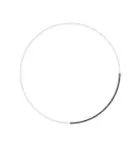
Which is to say, compared to a regular clock, everything is shifted 90°. Not ideal. I'll have to do some adjustments.
First, I translate the percentage of progress through the half hour to radians:
var minutes = date.getMinutes();
if(minutes >= 30) minutes -= 30;
var endArcRad = (Math.PI * 2) / 1800000 * (minutes * 60000 + date.getSeconds()*1000 + date.getMilliseconds());
2π is a full circle. We divide it by the number of milliseconds in an hour, calculate how many minutes we're into the current half hour, translate that to milliseconds, divide by the first figure to get a percentage, and apply that to the full circle (fun fact: I'm looking at the actual code now and for whatever reason, I'm basing that on a full hour, so I multiply everything by 2. Instead of doing what I'm doing here, which is to divide the radians by milliseconds in half an hour).
So this gives us the end position. We append it to three quarter of a circle, and now we get an arc that starts at 3/4 of the circle from the right edge (which is to say, 12:00) and goes to that end position.
cx.arc(middleX, middleY, radius, threeQuarter, threeQuarter + endArcRad + oneSec);
cx.stroke();
I don't remember why we add an extra second. I think it might be if we're at xx:00 and threeQuarters is equal to threeQuarter + endArcRad, which isn't valid. Or something.
But wait, doesn't that mean we only have the top left quarter to play with? What happens if we're past the first quarter of the half hour, won't three quarter + end go beyond 2π? Indeed it would. In these cases, we start by drawing the quarter, calculate what is left to paint after that, and draw the remainder from the "start" of the circle:
cx.arc(middleX, middleY, radius, threeQuarter, full);
cx.stroke();

var remainingArc = endArcRad - quarter;

cx.arc(middleX, middleY, radius, 0, remainingArc + oneSec);
cx.stroke();quarter, threequarter, full etc. are constants that correspond to the radians for a quarter circle and so on.
Finally, I want the clock to be a thin ring rather than a full circle. This works well with .arc, since you can specify a stroke side, which we define as 1/25th of the radius. Except! Once we get in the last 30 seconds. As the light flashes, I also start to progressively expand the width of the ring:
function getStrokeSize() {
	var date = new Date();
	var currentMinute = date.getMinutes();

	if(currentMinute == 29 || currentMinute == 59) {
		var second = date.getSeconds()/10 + (date.getMilliseconds()/10000);
		var strokeSize = Math.exp(second) * 3;

		return strokeSize < baseStrokeSize ? baseStrokeSize : strokeSize;
	} else {
		return baseStrokeSize;
	}
}
And that's about it. Does it work? Yeah it does. Check this out:
What's next?
I haven't run a clock party in a couple of years, and, since I've now given up drinking, I don't know that I ever will again. Maybe for a friend's birthday? Or maybe I repurpose that for a dinner party where we eat a dish every half hour, idk.
Code-wise, there's lots that could be done. This could use a general cleanup, as my notes throughout the article make clear, and nowadays I'd have to integrate my other light systems into it. I've long toyed with the idea of integrating an audio element into it too.
There is a tiny bit of customization possible in the code as it exists: besides changing the color values, you can enable and disable the Hue integration, and make the clock last a minute, an hour, or four hours. What I really should do is to extract all the integration into their own files, and have a proper json-based config. Maybe a web UI to control the system? I'll see if I revisit that in the future.